
Your Excel Link Assistant
Understand how your Excel files are linked and confidently roll them forward each reporting period. Visualise dependencies, update sources or filenames without breaking connections, and keep recurring reports accurate, consistent, and on schedule.

Easily visualise your current excel link connections as interactive workflow tree. No coding or technical skills required.

Get file monitoring and alerts . Stay on top of changes as they happen and keep all your spreadsheets synchronised.

Assign any new data source and easily generate a new set of connected and synchronised spreadsheets. No need to manually re-assign each link when a new spreadsheet file is created.

Assign commentary to your spreadsheet connections and keep track of historical changes.
Large financial reporting processes can contain hundreds of spreadsheet links. Manually verifying that every workbook references the correct files is slow and error-prone.
WorktreeX AI checks every relationship against your reporting rules, highlights anything that needs attention, and explains why—so you know exactly where to focus.
✅ Understand your reporting rules
Define how every spreadsheet link should behave using simple instructions.
✅ Review every dependency
AI analyses every workbook relationship and checks whether each link complies with your rules.
✅ Prioritise what matters
Every link is classified as Action, Warning or No Issue, with a clear explanation of the reasoning.



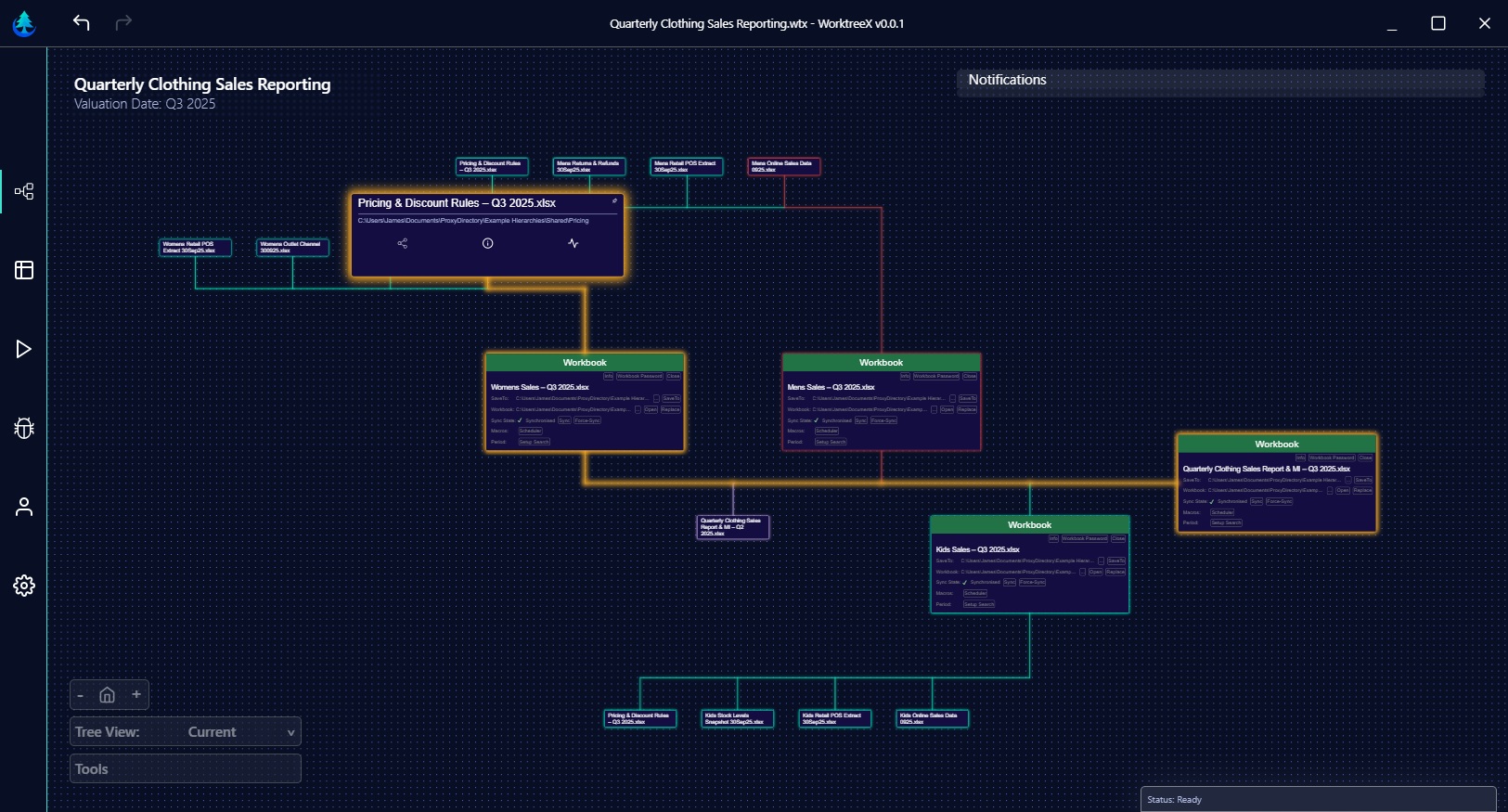

Visualize every spreadsheet and its connections in an interactive tree.
Rename files, update link paths, and sync changes—without breaking links.

One change updates everything—ensuring accuracy across your workflow.
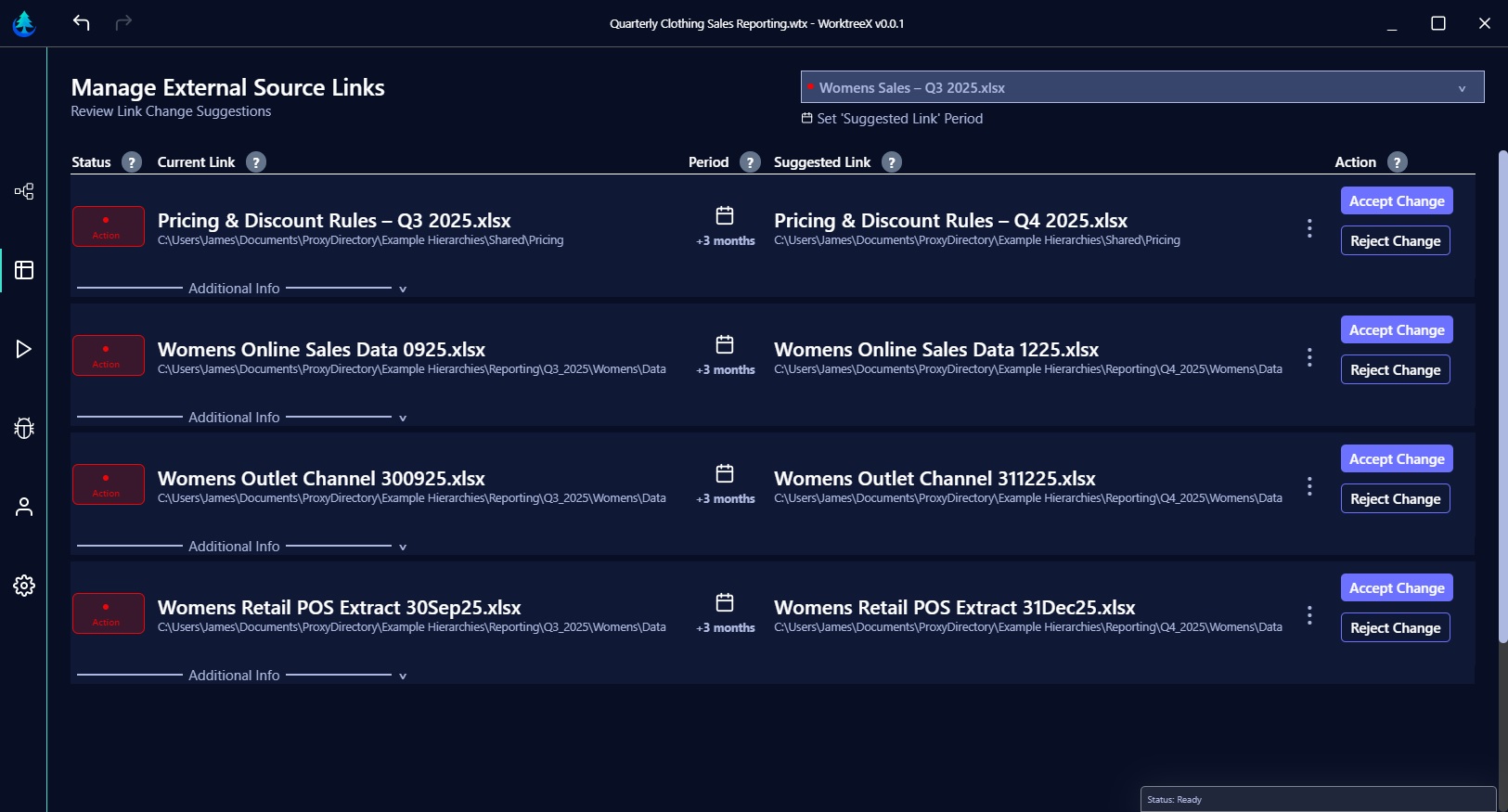
Automatically detects the most likely new file based on your update prompts.

Move forward by days, months, or years—links are updated to the right period files.

Review and approve suggestions instantly, keeping you in full control.
😩 Teams waste hours reconnecting links.
⏳ Every cycle repeats the same manual updates.
⚠️ Missed link updates put reports at risk.
📉 Outdated links make results unreliable.
🔒 No clear record of how links have changed.
🚫 Workflows stay hidden and hard to trace.
⚡ Automate cascaded workflows with zero coding.
⏳ Save time by avoiding manual link reconnections.
✅ Ensure accuracy with reliable synchronisation.
📜 Review and audit historical link changes anytime.
🔍 Gain clear visibility into your entire workflow.
🎉 Let your team focus on what matters most.
Answers to questions you might have about WorktreeX.

WorktreeX maps and manages all the connections between your spreadsheets in a clear, interactive hierarchy. It simplifies link updates, handles file renames and path changes, and keeps your entire workflow in sync — saving you from hours of manual relinking.
WorktreeX is designed for teams and individuals who rely on interconnected spreadsheets — from finance and accounting to operations, reporting, and analysis. Whether you manage a few linked files or complex multi-level hierarchies, WorktreeX ensures your data flows correctly.
Your spreadsheet data remains on your device. WorktreeX processes your spreadsheet files locally and does not send them to our servers. The only changes made are those you approve, giving you full control over your spreadsheets. By keeping processing local, WorktreeX minimizes the risk of external access while preserving the integrity of your workflows
Yes. WorktreeX works seamlessly with your existing spreadsheets and workflows. Please note that it requires a desktop version of Microsoft Excel to function, as it interacts directly with Excel files on your system. This ensures full compatibility with your current files while enabling WorktreeX to automate updates, manage links, and maintain your spreadsheet hierarchy efficiently.
Absolutely. WorktreeX is designed to be intuitive and user-friendly. You don’t need to understand complex formulas or file dependencies — the software handles that for you. With just a few clicks, you can visualize connections, make updates, and keep everything in sync.
Take the first step to simplifying your spreadsheet workflows with WorktreeX.